Reconstruction and registration
Surfaces from point clouds, and rigid alignment of two scans.
Screened Poisson reconstruction
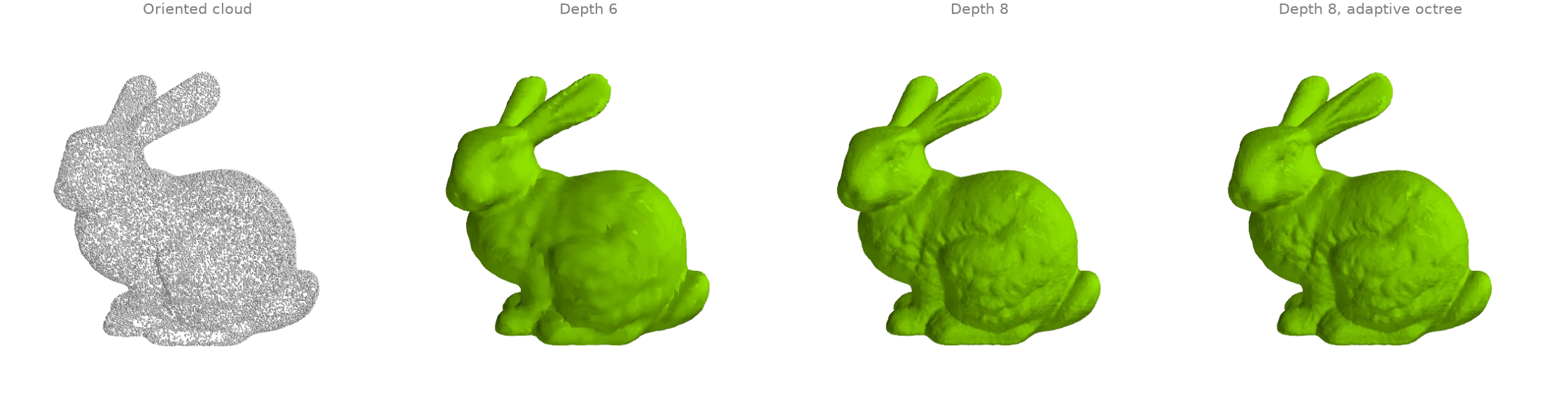
screened_poisson turns an oriented point cloud
into a closed surface: it solves for an indicator function whose gradient matches the
normals, screened towards zero at the points, and extracts its level set. depth sets the
grid resolution (2 ** depth cells across): depth 6 gives a smooth blob, depth 8 the
bunny's fur. method="adaptive" solves on an octree refined only near the points instead
of a dense grid.
from typing import Literal

import warp as wp

import ordito as od
from examples import data

points = data.load_points("bunny_cloud", device)
normals = wp.array(data.cloud_normals("bunny_cloud"), dtype=wp.vec3, device=device)

surfaces = {}
runs: list[tuple[str, int, Literal["dense", "adaptive"]]] = [
    ("dense6", 6, "dense"),
    ("dense8", 8, "dense"),
    ("adaptive8", 8, "adaptive"),
]
for name, depth, method in runs:
    vertices, faces = od.reconstruction.screened_poisson(
        points, normals, depth=depth, method=method
    )
    print(f"{method} depth {depth}: {faces.shape[0] // 3} faces")
    surfaces[name] = (vertices.numpy(), faces.numpy().reshape(-1, 3))
dense depth 6: 23720 faces
dense depth 8: 377948 faces
adaptive depth 8: 378540 faces
Modelled on: Open3D: Poisson surface reconstruction · PyMeshLab: screened Poisson
Ball pivoting
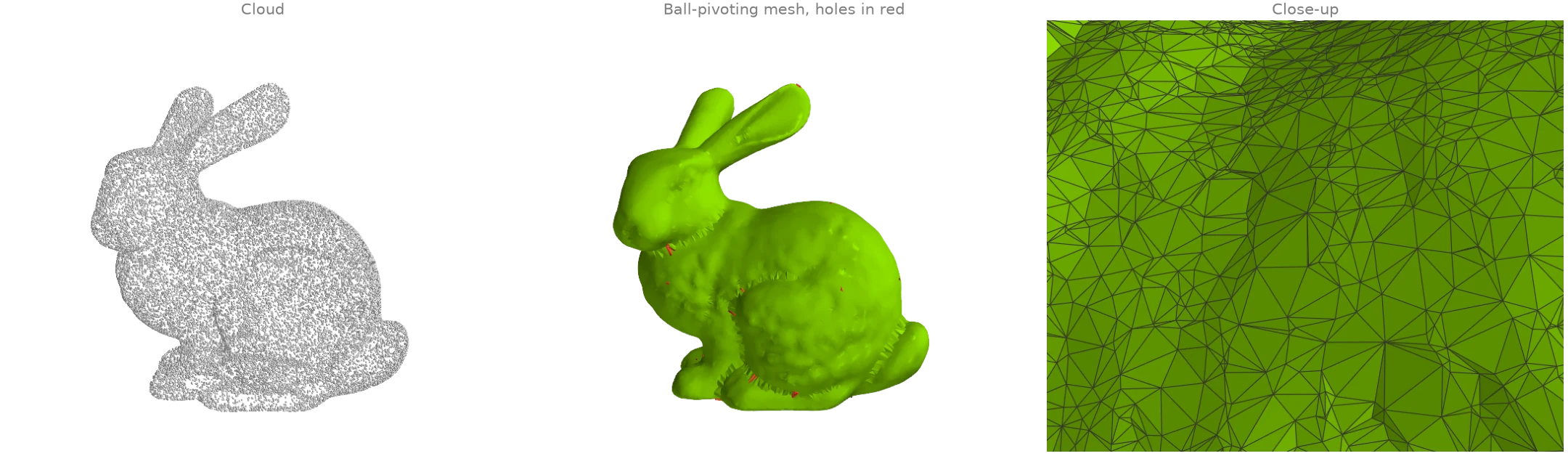
ball_pivoting rolls a ball of fixed radius over the
cloud: every three points the ball can rest on without containing another become a triangle,
and the ball pivots across each new edge to find the next. Unlike Poisson reconstruction it
interpolates the points (every vertex is an input point) and leaves holes where the
sampling is sparser than the ball, which
boundary_loops finds (red).
import warp as wp

import ordito as od
from examples import data

points = data.load_points("bunny_cloud", device)
normals = wp.array(data.cloud_normals("bunny_cloud"), dtype=wp.vec3, device=device)
# clustering=0 keeps candidates near an edge's ends: a random sample has many close pairs.
vertices, faces = od.reconstruction.ball_pivoting(points, normals, radius=0.003, clustering=0.0)

holes = od.boundary.boundary_loops(vertices, faces)
print(f"{faces.shape[0] // 3} triangles over {points.shape[0]} points")
print(f"{len(holes)} boundary loops left open")
58697 triangles over 30000 points
29 boundary loops left open
Modelled on: Open3D: ball pivoting · PyMeshLab: ball pivoting
Local triangulation and uniform resampling
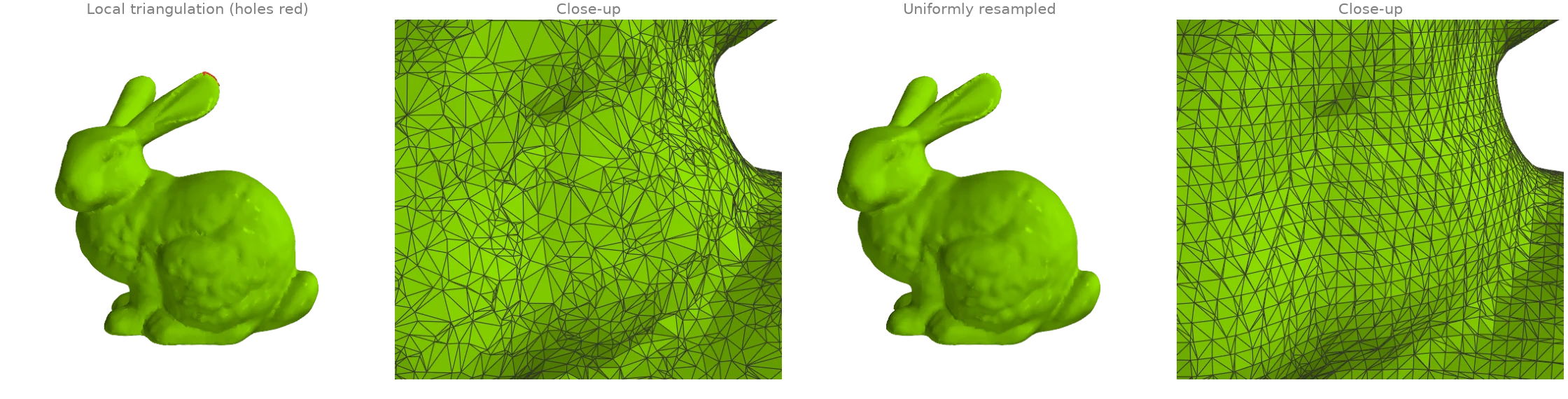
triangulate_point_cloud lets every point
build a small fan over its nearest neighbours in its tangent plane and keeps the triangles
that neighbouring fans agree on: a mesh whose vertices are exactly the input points, with
uneven triangles where the sampling is uneven.
resample_uniform then rebuilds any mesh from its
signed distance field on a uniform grid, so the result has evenly sized triangles and no
holes, at the cost of detail thinner than a voxel.
import warp as wp

import ordito as od
from examples import data

points = data.load_points("bunny_cloud", device)
normals = wp.array(data.cloud_normals("bunny_cloud"), dtype=wp.vec3, device=device)
local_vertices, local_faces = od.reconstruction.triangulate_point_cloud(points, normals)
holes = od.boundary.boundary_loops(local_vertices, local_faces)
print(f"local triangulation: {local_faces.shape[0] // 3} faces, {len(holes)} holes")

vertices, faces = od.reconstruction.resample_uniform(
    local_vertices, local_faces, voxel_size=0.0015
)
watertight = od.validation.is_watertight(vertices, faces)
print(f"resampled: {faces.shape[0] // 3} faces, watertight {watertight}")
local triangulation: 59903 faces, 8 holes
resampled: 74560 faces, watertight True
Modelled on: MeshLib: points to mesh · PyVista: reconstruct surface · PyMeshLab: uniform mesh resampling
Rigid ICP: point-to-point vs point-to-plane
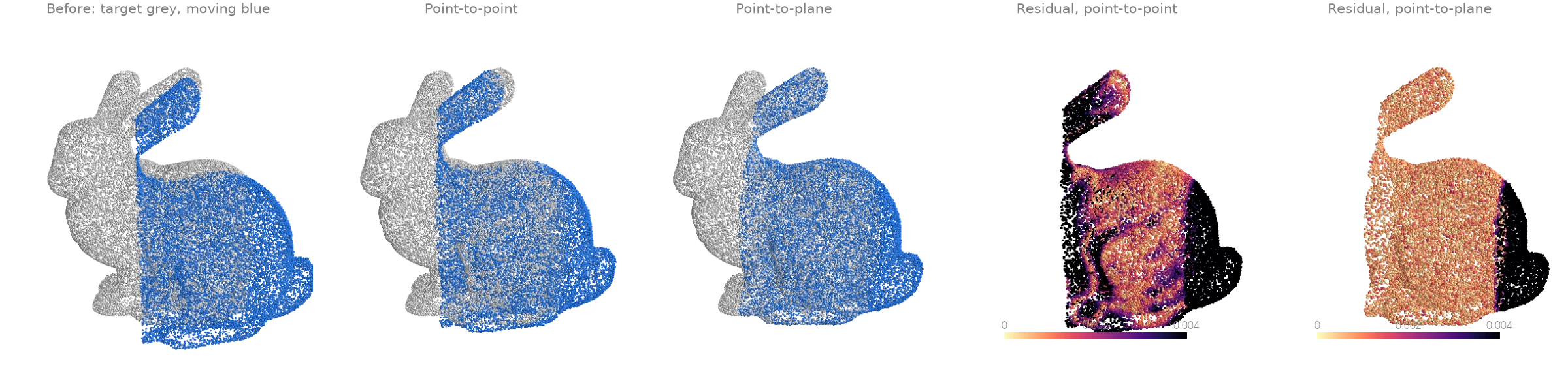
Two overlapping partial scans of the bunny, the second turned by 15 degrees and shifted.
Iterative closest point alternates between matching each point of the moving scan to its
nearest neighbour in the target and solving for the rigid motion that best fits the matches.
icp minimizes point-to-point distances; here it stalls in a
local minimum a third of the way there, because the scans only partly overlap and the
unmatched rims pull back.
icp_point_to_plane minimizes the distance to the
target's tangent planes (normals from estimate_normals),
which lets the scans slide along each other, and lands on the true pose.
import numpy as np

import ordito as od
from examples import data

target = data.load_points("scan_a", device)
moving = data.load_points("scan_b", device)
neighbours, _ = od.neighbors.query_nearest(target, target, k=16)
target_normals = od.points.estimate_normals(target, neighbours)

_, point_to_point, _ = od.registration.icp(moving, target, max_iterations=50, max_distance=0.02)
matrix, point_to_plane, _ = od.registration.icp_point_to_plane(
    moving, target, target_normals=target_normals, max_iterations=50, max_distance=0.02
)
for name, aligned in (("point-to-point", point_to_point), ("point-to-plane", point_to_plane)):
    _, residual = od.neighbors.query_nearest(target, aligned, k=1)
    print(f"{name}: median distance to the target {np.median(residual.numpy()):.5f}")
angle = np.degrees(np.arccos((np.trace(matrix.numpy()[0][:3, :3]) - 1.0) / 2.0))
print(f"point-to-plane recovered a rotation of {angle:.1f} degrees")
point-to-point: median distance to the target 0.00259
point-to-plane: median distance to the target 0.00084
point-to-plane recovered a rotation of 15.1 degrees
Reading the cost. The third return value says how well the moved scan fits. icp and
procrustes report the mean squared distance, so its
square root is an RMS distance in the scan's units, and a converged fit sits at the noise
level of the data. icp_point_to_plane reports the sum of squared point-to-plane
residuals (Open3D's convention): divide by the point count before taking the root.
When ICP stops too early. icp stops when the cost improves by less than threshold
between iterations. On a smooth, curved target point-to-point ICP corrects a rotation
slowly, because every closest point slides along the surface, so the default stopping rule
can fire with the rotation still visibly wrong. Tighten it (threshold=1e-9, more
max_iterations) and check that the RMS distance comes down to your scanner's noise, or
switch to point-to-plane, which does not pay for sliding.
When the start is far off. ICP finds the nearest good alignment only. Pass a better
starting pose with initial= (a wp.mat44), from the capture setup or from a
Procrustes fit over a few hand-picked landmark pairs.
Modelled on: Open3D: ICP registration · MeshLib: ICP · libigl 808 · trimesh: scan registration
Robust ICP with outliers
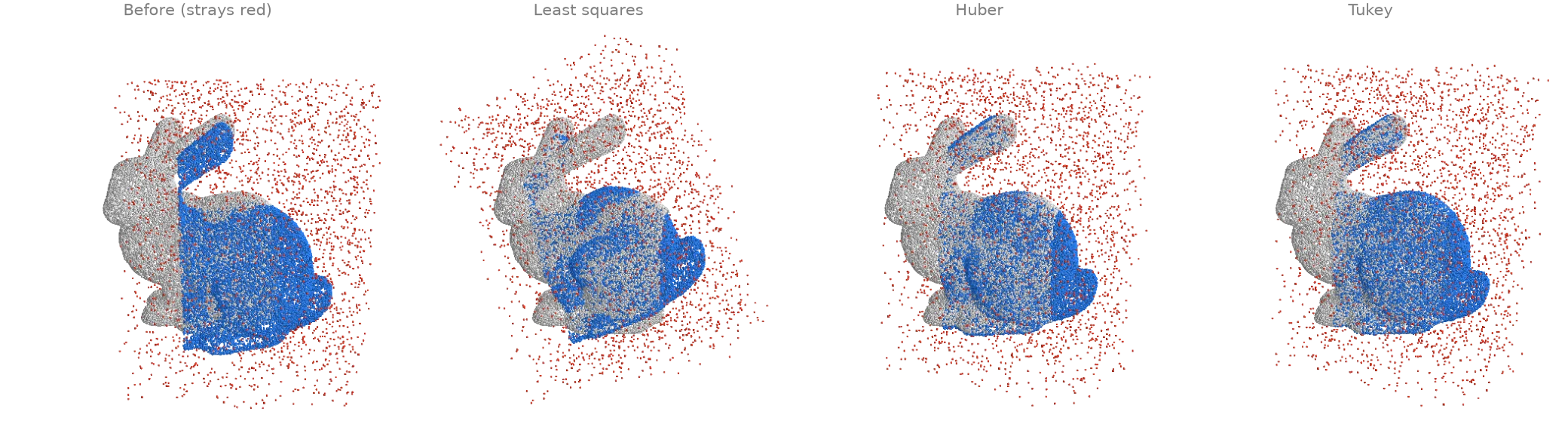
The moving scan of RR4 again, now cluttered with 15 % stray points around it, and no
distance cut-off on the matches. Plain least squares lets every stray pull on the fit, and
icp_point_to_plane converges to a wrong pose. A
robust kernel down-weights large residuals: robust_kernel="huber" caps their influence,
"tukey" ignores them beyond a scale estimated from the residuals' median absolute
deviation, and both recover the pose.
import numpy as np

import ordito as od

target = data.load_points("scan_a", device)
moving = data.load_points("scan_b_outliers", device)
neighbours, _ = od.neighbors.query_nearest(target, target, k=16)
target_normals = od.points.estimate_normals(target, neighbours)

aligned = {}
for kernel in ("none", "huber", "tukey"):
    matrix, aligned[kernel], _ = od.registration.icp_point_to_plane(
        moving, target, target_normals=target_normals, robust_kernel=kernel, max_iterations=50
    )
    rotation = matrix.numpy()[0][:3, :3]
    angle = np.degrees(np.arccos(np.clip((np.trace(rotation) - 1.0) / 2.0, -1.0, 1.0)))
    print(f"{kernel:>5}: recovered a rotation of {angle:.1f} degrees (true: 15.0)")
 none: recovered a rotation of 28.2 degrees (true: 15.0)
huber: recovered a rotation of 15.4 degrees (true: 15.0)
tukey: recovered a rotation of 15.6 degrees (true: 15.0)
Modelled on: Open3D: robust kernels
Known correspondences: Procrustes alignment
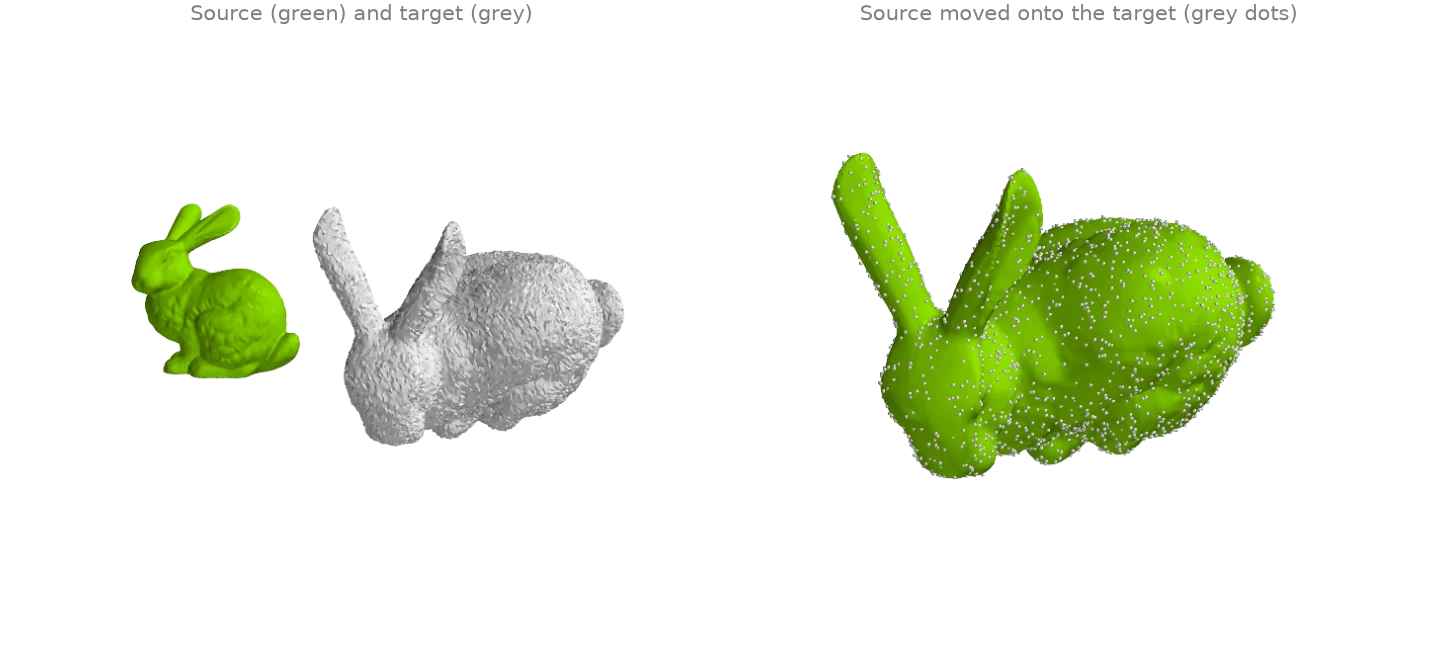
When point i of one set is known to match point i of the other (landmarks, a tracked
mesh, a deformed copy), no iteration is needed: procrustes
solves for the best rotation, translation and, optionally, uniform scale in closed form (the
Kabsch-Umeyama solution). Here a copy of the bunny is scaled by 1.6, turned 70 degrees, moved
and jittered, and the transform is recovered from the vertex correspondence alone.
import numpy as np
import warp as wp

import ordito as od
from examples import data

vertices, _ = data.load("bunny", device)
rng = np.random.default_rng(0)
turn = data.rotation((1.0, 0.4, 0.2), 70.0)
copy = 1.6 * vertices.numpy() @ turn.T + [0.25, 0.05, -0.1]
copy += rng.normal(0.0, 0.0005, copy.shape)
target = wp.array(copy, dtype=wp.vec3, device=device)

matrix, aligned, cost = od.registration.procrustes(vertices, target, reflection=False)
linear = matrix.numpy()[0][:3, :3]
print(f"recovered scale {np.cbrt(np.linalg.det(linear)):.4f} (true 1.6)")
# `cost` is the mean squared distance, so its root is the RMS residual: the jitter alone.
print(f"rms residual {np.sqrt(cost):.5f}, jitter {0.0005 * np.sqrt(3):.5f}")
recovered scale 1.6001 (true 1.6)
rms residual 0.00087, jitter 0.00087
Modelled on: pytorch3d: corresponding_points_alignment · trimesh: procrustes
From a bare scan: normals, then Poisson or ball pivoting
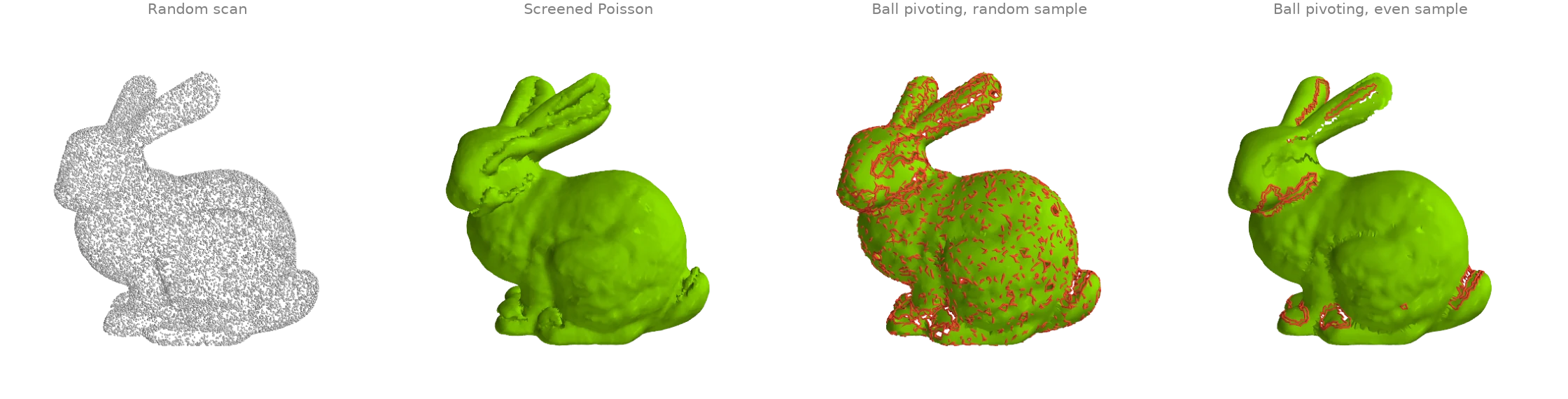
A scanner gives points without normals, so the pipeline starts with
estimate_normals. The two reconstructions then answer
different questions. screened_poisson is closed
whatever the sampling looks like, but its vertices are new points.
ball_pivoting keeps the input points as vertices,
and is only as good as the sampling: a random sample clumps in places and leaves gaps the
ball falls through, while the same number of points spread evenly by
sample_surface_blue_noise leaves far fewer holes
(rims in red).
import warp as wp

import ordito as od
from examples import data

vertices, faces = data.load("bunny", device)
random_points, _ = od.sample.sample_surface(vertices, faces, 20_000, seed=0)
even_points, _ = od.sample.sample_surface_blue_noise(vertices, faces, radius=0.00135, seed=0)

def normals_of(points: wp.array[wp.vec3]) -> wp.array[wp.vec3]:
    neighbours, _ = od.neighbors.query_nearest(points, points, k=16)
    return od.points.estimate_normals(points, neighbours)

poisson = od.reconstruction.screened_poisson(random_points, normals_of(random_points), depth=7)
print(f"screened Poisson: {poisson[1].shape[0] // 3} faces")
print(f"watertight: {od.validation.is_watertight(*poisson)}")

pivoted = {}
for name, points in (("random", random_points), ("even", even_points)):
    pivoted[name] = od.reconstruction.ball_pivoting(points, normals_of(points))
    holes = od.boundary.boundary_loops(*pivoted[name])
    print(f"ball pivoting, {name} sample of {points.shape[0]}: {len(holes)} holes")
screened Poisson: 119100 faces
watertight: True
ball pivoting, random sample of 20000: 1238 holes
ball pivoting, even sample of 19918: 26 holes
Orienting normals on a real scan. A plane fit fixes each normal's line, not its sign. By
default every normal points away from the cloud's centroid, which is right for a closed,
roughly convex object and wrong in deep concavities (PC3 shows where).
camera_location=wp.vec3(...) points every normal toward the scanner, the right choice for a
single-view scan; orient_reference=wp.vec3(...) points them along one direction (+z for
terrain). k=16 neighbours is a common default: raise it for noisy data, lower it where the
surface has fine detail.
Choosing between the two. Use screened_poisson for noisy or unevenly sampled clouds and
whenever the surface must be closed (a volume, a print, inside/outside tests); each extra
depth level gives about four times the faces at about eight times the cost
(RR1). Use ball_pivoting when output vertices must be input points (to carry
per-point colours or labels) and the cloud is dense and evenly spaced. If the sampling is
uneven, thin it out evenly first rather than hoping a larger ball bridges the gaps.
Modelled on: Open3D: surface reconstruction