Parametrization and textures
Flattening surfaces into the plane, cutting seams, and baking fields into textures.
Flattening a disk: Tutte, harmonic, LSCM and ARAP
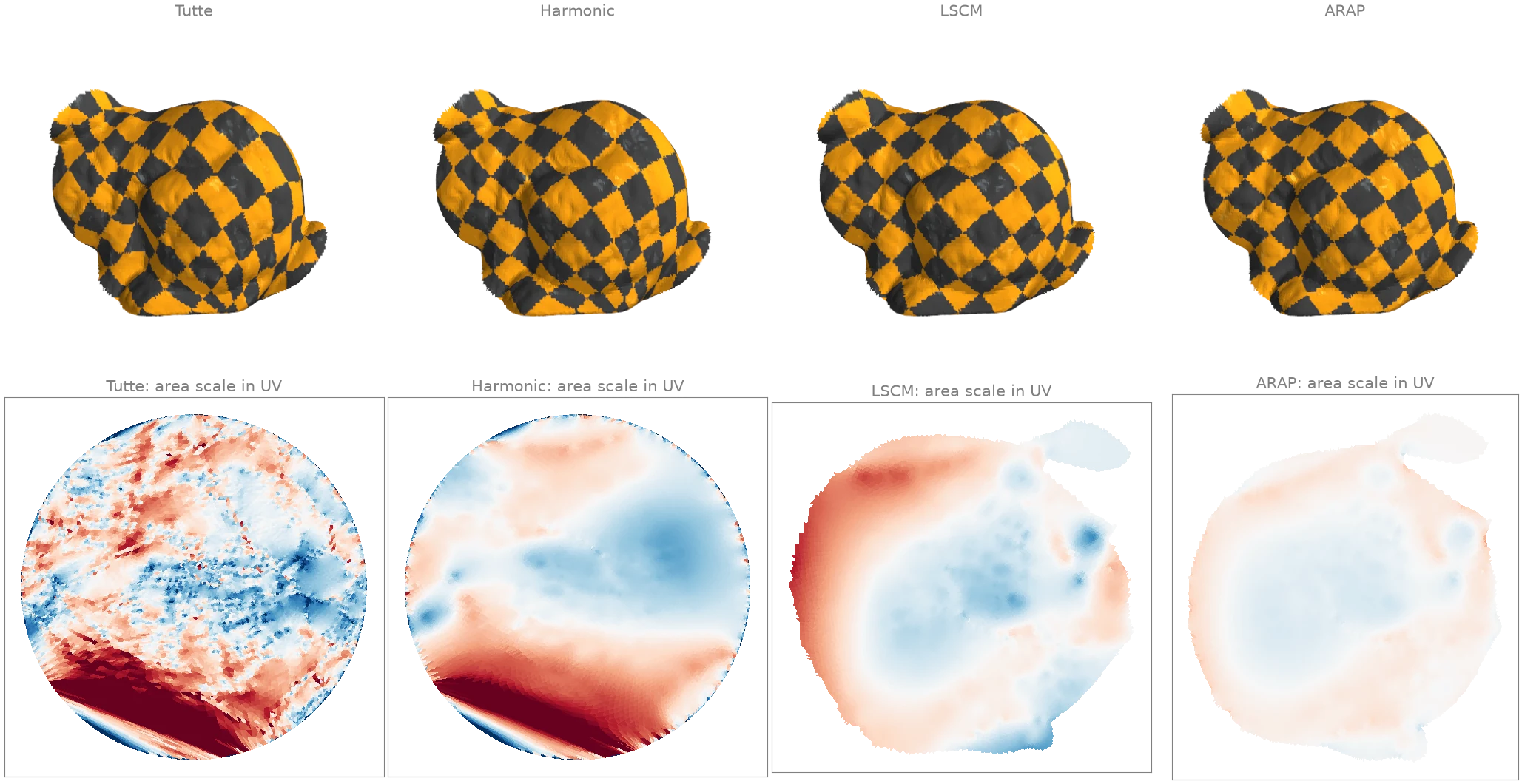
Four ways to map a disk-shaped patch of the bunny into the plane, each drawn as a checkerboard texture and as its UV layout:
tutteandharmonicpin the boundary (longest_boundary_loop) to a circle withmap_vertices_to_circleand solve for the interior, with uniform and cotangent weights;lscmpins only two vertices and finds the most conformal (angle-preserving) map, with a free boundary;arapstarts from the LSCM map and makes every triangle as close to a rigid copy of itself as it can, so lengths are preserved too.
face_flipped_mask checks that no triangle is
turned over. The UV layouts are coloured by how much each triangle's area is scaled (red:
enlarged, blue: shrunk, on a log scale from 1/4 to 4): forcing the boundary onto a circle
stretches part of the patch, LSCM keeps angles but not areas, and ARAP keeps both close to the
surface's.
import numpy as np
import warp as wp

import ordito as od
from examples import data

vertices, faces = data.load("face_patch", device)
boundary = od.boundary.longest_boundary_loop(vertices, faces)
circle = od.parametrization.map_vertices_to_circle(vertices, boundary)

uv = {
    "Tutte": od.parametrization.tutte(vertices, faces, boundary, circle),
    "Harmonic": od.parametrization.harmonic(vertices, faces, boundary, circle),
}
# LSCM: pin two opposite boundary vertices at their true distance apart.
b = boundary.numpy()
pins = wp.array([b[0], b[b.size // 2]], dtype=wp.int32, device=device)
span = np.linalg.norm(vertices.numpy()[b[0]] - vertices.numpy()[b[b.size // 2]])
pinned_uv = wp.array([(0.0, 0.0), (span, 0.0)], dtype=wp.vec2, device=device)
uv["LSCM"] = od.parametrization.lscm(vertices, faces, pins, pinned_uv)
uv["ARAP"] = od.parametrization.arap(
    vertices,
    faces,
    od.typing.as_dense(pins[:1]),
    od.typing.as_dense(pinned_uv[:1]),
    uv["LSCM"],
    max_iterations=50,
)

for name, coordinates in uv.items():
    flipped = od.parametrization.face_flipped_mask(coordinates, faces).numpy().sum()
    print(f"{name:>8}: {flipped} flipped triangles")
   Tutte: 0 flipped triangles
Harmonic: 0 flipped triangles
    LSCM: 0 flipped triangles
    ARAP: 0 flipped triangles
Modelled on: libigl 501: harmonic · libigl 502: LSCM · libigl 503: ARAP · PyMeshLab: parametrization
Cutting a closed surface open along seams
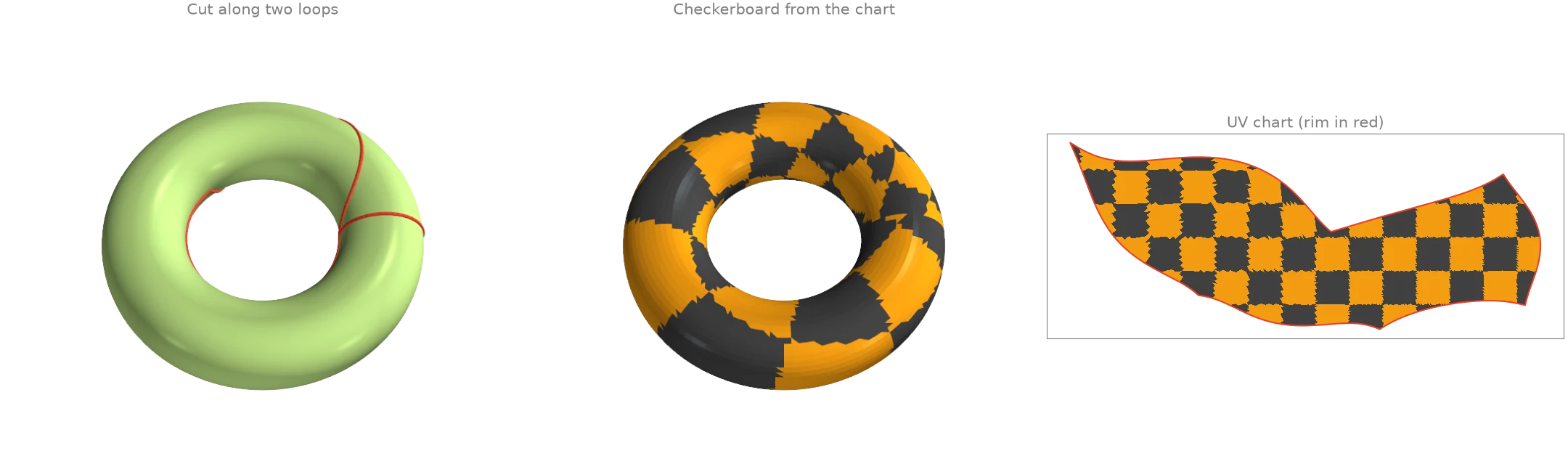
A torus cannot be flattened as it is: it has no boundary and two independent loops around it.
Cutting along one loop of each kind opens it into a disk. The loops come from
homology_generators, straightened by
shorten_loop;
cut_along_edges duplicates the vertices along them so the
two sides come apart, and lscm flattens the result into a
rectangle-like chart. Reading the chart back,
uv_seam_edges finds exactly the edges where the two sides of
the cut land in different places in UV, and
seam_edge_vertices turns them back into vertex pairs.
import numpy as np
import warp as wp

import ordito as od
from examples import data

vertices, faces = data.load("torus", device)
loops = od.homology.homology_generators(vertices, faces)
loops, _ = od.geodesic_walk.shorten_loop(vertices, faces, loops, max_iter=1000)
ring = [loop.numpy() for loop in loops]
cut = np.concatenate([np.stack([loop, np.roll(loop, -1)], axis=1) for loop in ring])

cut_vertices, cut_faces = od.seams.cut_along_edges(
    vertices, faces, wp.array(cut, dtype=wp.int32, device=device)
)
rim = od.boundary.boundary_loops(cut_vertices, cut_faces)
print(
    f"{len(loops)} loops, {cut.shape[0]} cut edges; the cut mesh has {len(rim)} boundary loop"
)

b = rim[0].numpy()
pins = wp.array([b[0], b[b.size // 2]], dtype=wp.int32, device=device)
pinned_uv = wp.array([(0.0, 0.0), (1.0, 0.0)], dtype=wp.vec2, device=device)
uv = od.parametrization.lscm(cut_vertices, cut_faces, pins, pinned_uv)

seams, _, _ = od.seams.uv_seam_edges(faces, uv, face_texcoords=cut_faces)
seam_pairs = od.seams.seam_edge_vertices(faces, seams)
print(f"seams found from the UV chart: {seam_pairs.shape[0]} edges")
2 loops, 176 cut edges; the cut mesh has 1 boundary loop
seams found from the UV chart: 176 edges
Modelled on: libigl: seam edges · PyMeshLab: cut along crease edges
Baking a field into a texture and reading it back
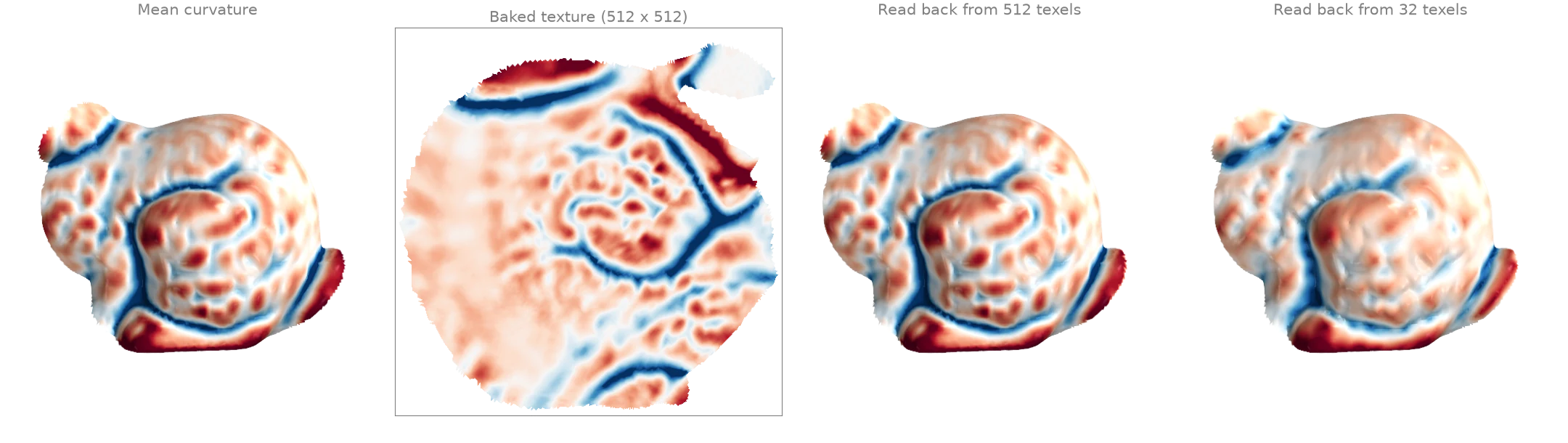
With a UV chart, any per-vertex quantity can be stored as an image. Here the mean curvature
of the bunny patch from principal_curvature is
baked by rasterize_attribute, which fills every
texel a triangle covers by interpolating across it in the lscm
chart. remap_attribute_from_uv samples the image
back onto the vertices: at 512 texels the round trip is close to exact, while a 32-texel
texture keeps only the broad shape of the field.
import numpy as np
import warp as wp

import ordito as od
from examples import data

vertices, faces = data.load("face_patch", device)
boundary = od.boundary.longest_boundary_loop(vertices, faces).numpy()
pins = wp.array([boundary[0], boundary[boundary.size // 2]], dtype=wp.int32, device=device)
pinned_uv = wp.array([(0.0, 0.0), (1.0, 0.0)], dtype=wp.vec2, device=device)
uv = od.parametrization.lscm(vertices, faces, pins, pinned_uv).numpy()
uv = (uv - uv.min(axis=0)) / np.ptp(uv, axis=0).max() * 0.98 + 0.01  # fit into [0, 1]
uv = wp.array(uv, dtype=wp.vec2, device=device)

_, _, k1, k2 = od.curvature.principal_curvature(vertices, faces)
mean = 0.5 * (k1.numpy() + k2.numpy())
field = wp.array(mean[:, None], dtype=wp.float32, device=device)

images, restored = {}, {}
for resolution in (512, 32):
    images[resolution] = od.texture.rasterize_attribute(uv, faces, field, resolution)
    restored[resolution] = od.texture.remap_attribute_from_uv(uv, images[resolution])
    error = np.abs(restored[resolution].numpy()[:, 0] - mean)
    relative = np.median(error) / np.ptp(mean)
    print(f"{resolution:>3} texels: median error {relative:.2%} of the field's range")
512 texels: median error 0.07% of the field's range
 32 texels: median error 1.43% of the field's range
Modelled on: trimesh: texture